Find it from anywhere
Press Option-Tab in any app. Search the title, URL, or the fragment you still remember.
A private browser workspace for Mac. Save entire windows as sessions, organize years of research, sync through iCloud, and jump to any open or saved tab across Safari, Chrome, Edge, and Firefox.
macOS 11+ · No account required · Your sessions stay in your iCloud
Tab Space has appeared in Apple-curated App Store collections, including Safari Essentials and guides for people setting up a new Mac.
Tabs are not clutter. They are unfinished work. Tab Space gives that work a fast way back—whether the page is still open or was saved weeks ago.
Press Option-Tab in any app. Search the title, URL, or the fragment you still remember.
Tab Space brings the right browser, window, and tab to the front—not merely the browser app.
Turn a window into a named session, close the tabs, and return without rebuilding your train of thought.
Keep using the browsers you already chose. Tab Space connects their open tabs to one searchable, durable session library on your Mac.
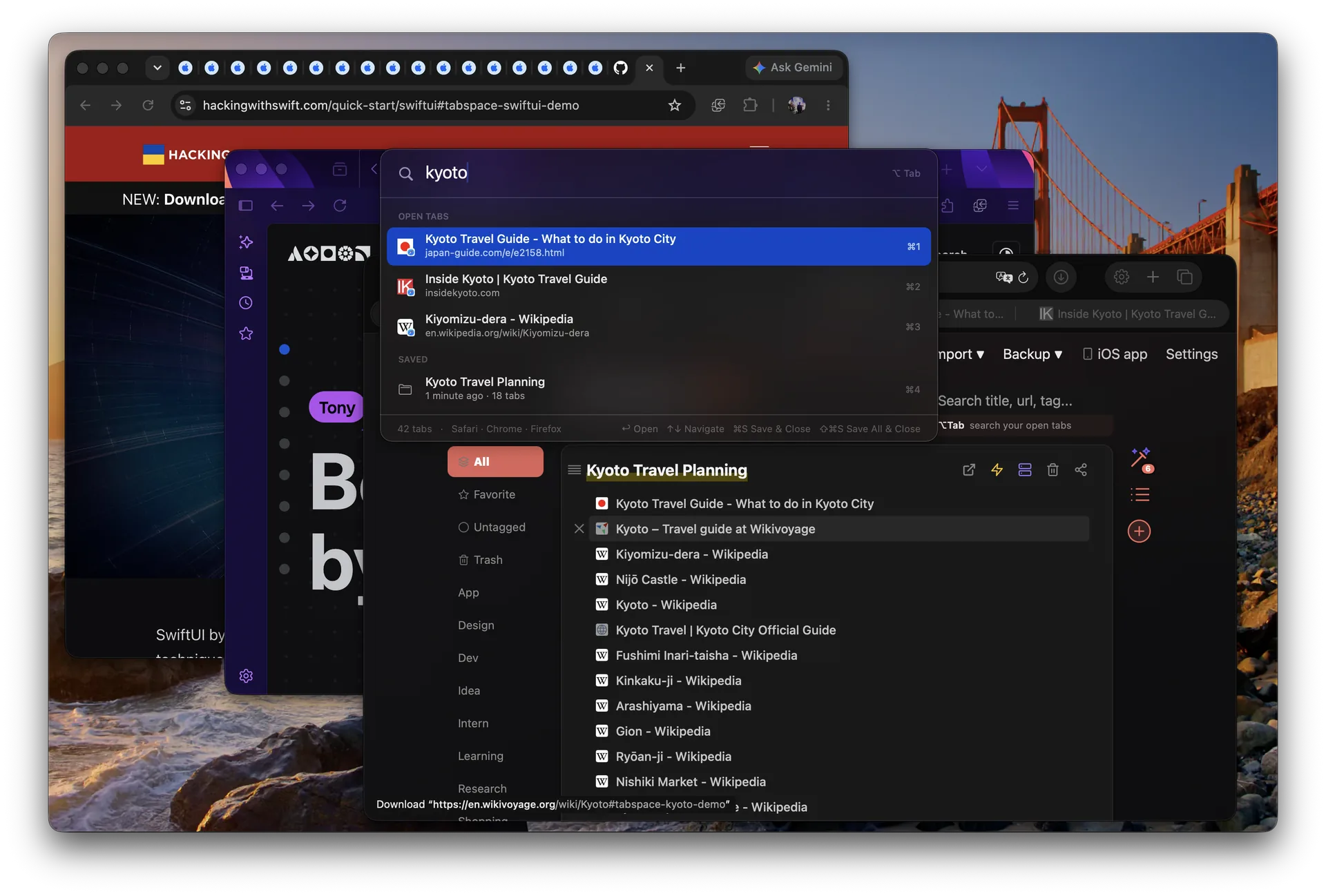
Switcher is the front door. Behind it is a Mac-native library built to keep years of browser context findable, portable, and safe.
Navigate results with the keyboard, reopen a saved session, or save and close the current tab without leaving the panel. Select several tabs at once, close the ones you are done with, and clear duplicates in a single keystroke.
Explore the switcher →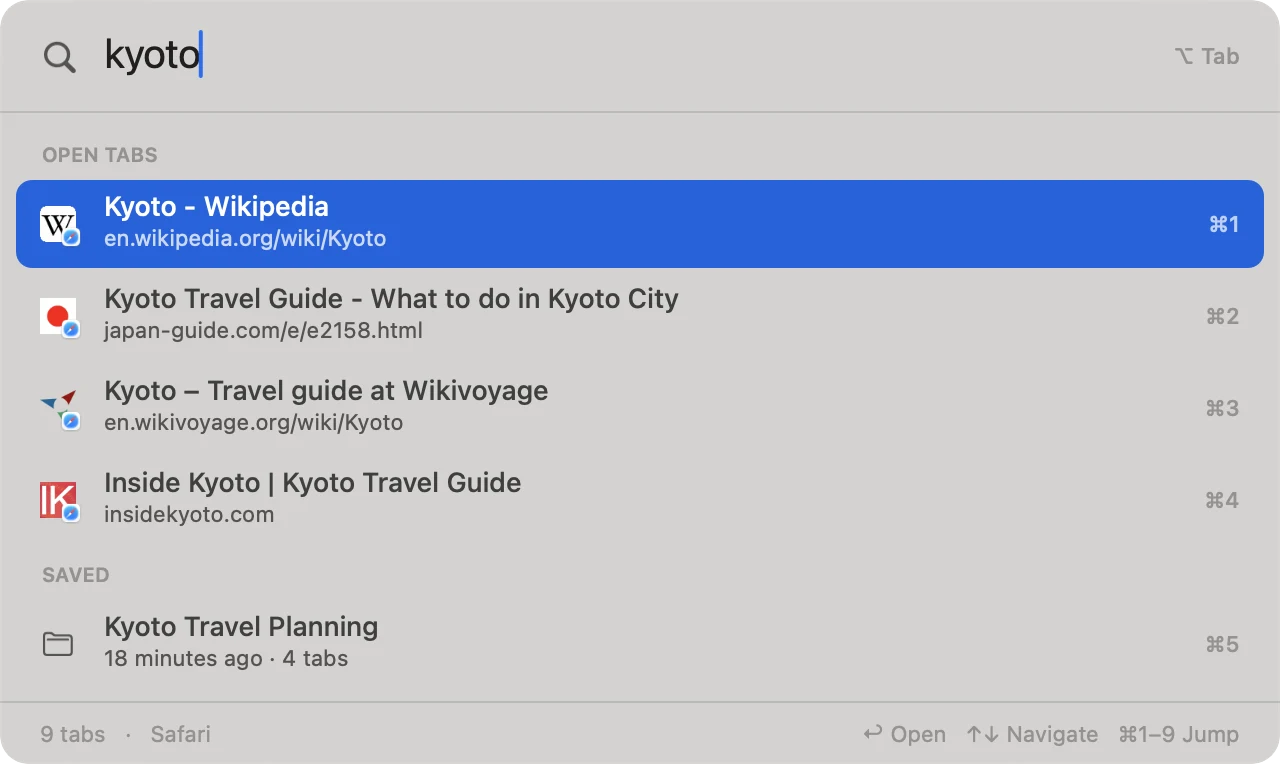
A session keeps related tabs together with a title, tags, notes, and the context you need when you come back.
Sessions live in a native database and sync across Mac, iPhone, and iPad through your own iCloud. No Tab Space account required.
Hourly, daily, weekly, and monthly snapshots protect your library. Restore any backup when you need it.
Name a session, suggest tags, or split mixed tabs by topic. AI is optional and only receives the session you choose.
Tab Space was built around one durable idea: your work should outlive a browser window. Years of releases and user feedback have shaped it into a complete workspace for saving, organizing, syncing, and returning.
Read the release history →Real words from Mac users who use Tab Space for research, projects, and keeping hundreds of tabs under control.
“The app is great and does what it says. Most importantly, the developer is incredibly responsive.”
“Tab Space is more flexible and easy to add, remove, and rearrange tabs.”
“A must-have for those that tend to have a lot of tabs open when they do research.”
“If you have focus issues, do yourself a favor and buy this. It’s totally worth it.”
“It’s so simple but so functional.”
“It’s perfect—it even has shortcuts I can use to streamline everything.”
“Way more useful than Safari’s built-in bookmarks—and the UI is well designed.”
“Now that I am using this extension, my Mac is much faster and runs very smoothly.”
“Greatest app that Safari never made.”
Excerpts from verified five-star App Store reviews. Minor spelling and punctuation normalized for readability.
Use the core workflow before paying. Upgrade once for an unlimited library, or choose Pro for tab collection from other browsers and unlimited AI organization.
$0
Free download
$9.99
One-time purchase
$17.99 / year
Or $1.99/month · annual plan includes a 7-day free trial
US prices shown; App Store pricing varies by region. People who purchased Tab Space before version 4.0 automatically keep permanent Plus at no charge.
The companion app keeps your session library close through iCloud, and its Safari extension can save all open mobile tabs in one step.
Download for iPhone and iPad →Tab Space supports Safari, Chrome, Microsoft Edge, and Firefox 121 or later on Mac. Library access is included in every plan. Saving tabs from other browsers and live-tab switching require Pro; Safari support remains part of the core app.
Sessions live in a native app database on your device, outside the browser, and sync through your own iCloud. You do not need to create a Tab Space account. AI only receives session information you explicitly choose to process.
Tab Space only prevents creating another saved session. It never deletes, hides, or locks the sessions you already have, and you can keep using the rest of the core app.
Anyone who bought the Mac app before version 4.0 automatically receives permanent Plus at no charge. No subscription or action is required, and every feature that existed before 4.0 remains available.
Yes. Tab Space can import saved tab lists and native archives. Your own sessions can be exported at any time as Text, Markdown, HTML, or JSON.
Yes. Sessions sync through your iCloud between Macs, iPhones, and iPads. The iOS app is currently a separate App Store app; membership support will arrive in a future iOS release.
The Mac app requires macOS 11 or later. The companion app requires iOS or iPadOS 16 or later.
Download Tab Space free and give Option-Tab a place in your muscle memory.
 Safari
 Chrome
 Microsoft Edge
 Firefox